
Managing dependencies
A Buf module can depend on other modules in the same workspace and on modules published to the Buf Schema Registry (BSR), including community modules like googleapis and modules owned by other teams in your organization.
External dependencies are declared in buf.yaml under deps, pinned in buf.lock by the Buf CLI, and imported by path from any .proto file in the workspace. Modules within the same workspace can depend on each other with no declaration:
buf.yaml
version: v2
modules:
  - path: proto
    name: buf.build/acme/petapis
  - path: vendor # Path to .proto files for the payment system
deps:
  - buf.build/googleapis/googleapis
In this example, petapis can import from vendor without any configuration, and both modules can import from googleapis.
Referencing a module
A reference is the string you put under deps to point at a module on the BSR. It’s the module’s name, optionally followed by a colon and either a commit ID or label.
Leaving the colon off resolves to the latest approved commit on the repository’s default label:
Latest commit on the default label
deps:
  - buf.build/bufbuild/protovalidate
Pin to a label to track whatever commit the label currently points at. This is useful for following a specific release, or consuming pre-release schemas from another team:
Label
deps:
  - buf.build/bufbuild/protovalidate:v0.6.3
Pin to a commit ID when you want a dependency that won’t move until you explicitly update it:
Commit ID
deps:
  - buf.build/bufbuild/protovalidate:b983156c5e994cc9892e0ce3e64e17e0
Authors are expected to keep their modules backwards-compatible, so the unpinned form is fine in most cases. Reach for label or commit pinning when you need build reproducibility or you’re consuming a pre-release schema that could change under you.
buf.yaml and buf.lock
Buf uses two files to manage dependencies.
buf.yaml declares the workspace’s modules and their external dependencies. It’s hand-edited and checked in. buf.lock records the exact commit and digest of every direct and transitive external dependency. It’s generated by the Buf CLI and checked in:
Example buf.lock
# Generated by buf. DO NOT EDIT.
version: v2
deps:
  - name: buf.build/googleapis/googleapis
    commit: 7a6bc1e3207144b38e9066861e1de0ff
    digest: b5:6d05bde5ed4cd22531d7ca6467feb828d2dc45cc9de12ce3345fbddd64ddb1bf0db756558c32ca49e6bc7de4426ada8960d5590e8446854b81f5f36f0916dc48
Two Buf CLI commands manage buf.lock:
buf dep updateresolves every reference inbuf.yamlto its current commit and writes the result tobuf.lock, including transitive dependencies. Run it after you add, remove, or change adepsentry, or when you want to pick up new commits on an unpinned reference.buf dep pruneremovesbuf.lockentries that aren’t used by anything in the workspace.
How imports resolve
When a .proto file imports another .proto file, the import statement names the target by path. Resolution has two stages: local first, then modules under deps.
Local imports
Every .proto file in the workspace is searched relative to the directory containing buf.yaml. If the import path matches a local file, that’s what gets resolved.
Given this layout:
workspace_root
├── buf.yaml
├── bar
│   └── bar.proto
└── foo
    └── foo.proto
    └── foo2.proto
A file in foo/ imports bar/bar.proto as:
foo/foo.proto
import "bar/bar.proto";Imports of sibling files follow the same rule: the path is always relative to the buf.yaml, not to the importing file:
foo/foo2.proto
// Invalid: paths are not relative to foo.proto
import "foo.proto";
// Correct: paths are relative to buf.yaml
import "foo/foo.proto";
Module imports
If an import isn’t found locally, Buf searches the modules listed under deps in declaration order. Given this buf.yaml:
buf.yaml
version: v2
deps:
  - buf.build/googleapis/googleapis
An import like:
import "google/type/datetime.proto";is looked up first in the workspace, then in buf.build/googleapis/googleapis. If no module contains the path, resolution fails and buf reports an error.
Well Known Types
Well Known Types under google.protobuf (google/protobuf/timestamp.proto, google/protobuf/any.proto, and so on) are compiled into Buf and every Protobuf runtime. Import them directly without declaring a dependency and without vendoring the files:
import "google/protobuf/timestamp.proto";See standard imports for the full list.
Dependency caching and offline use
Buf caches downloaded dependencies on disk when you run commands that need them (buf build, buf lint, buf breaking, and so on). Once the cache is populated, commands that use only cached modules work offline.
The cache directory is picked in this order:
$BUF_CACHE_DIRif set.$XDG_CACHE_HOME/bufif$XDG_CACHE_HOMEis set.$HOME/.cache/bufon macOS and Linux,%LocalAppData%\bufon Windows.
The cache is only consulted for modules listed under deps. Modules inside the workspace are served from the workspace directly, so local edits show up without any publish-and-update round trip.
Tamper-proofing dependencies
Every BSR commit is content-addressed by a cryptographic manifest digest, and buf.lock records that digest alongside every dependency. If a downloaded dependency’s content doesn’t match what buf.lock expects, buf build fails loudly so a tampered upstream can’t silently reach consumers.
See Tamper-proofing dependencies for the threat model and verification flow.
Viewing dependencies and dependents
Every module’s BSR repository has a Deps tab that lists both direct and indirect dependencies and any modules that depend on this one. Entries are clickable so you can navigate through a dependency tree in the UI:
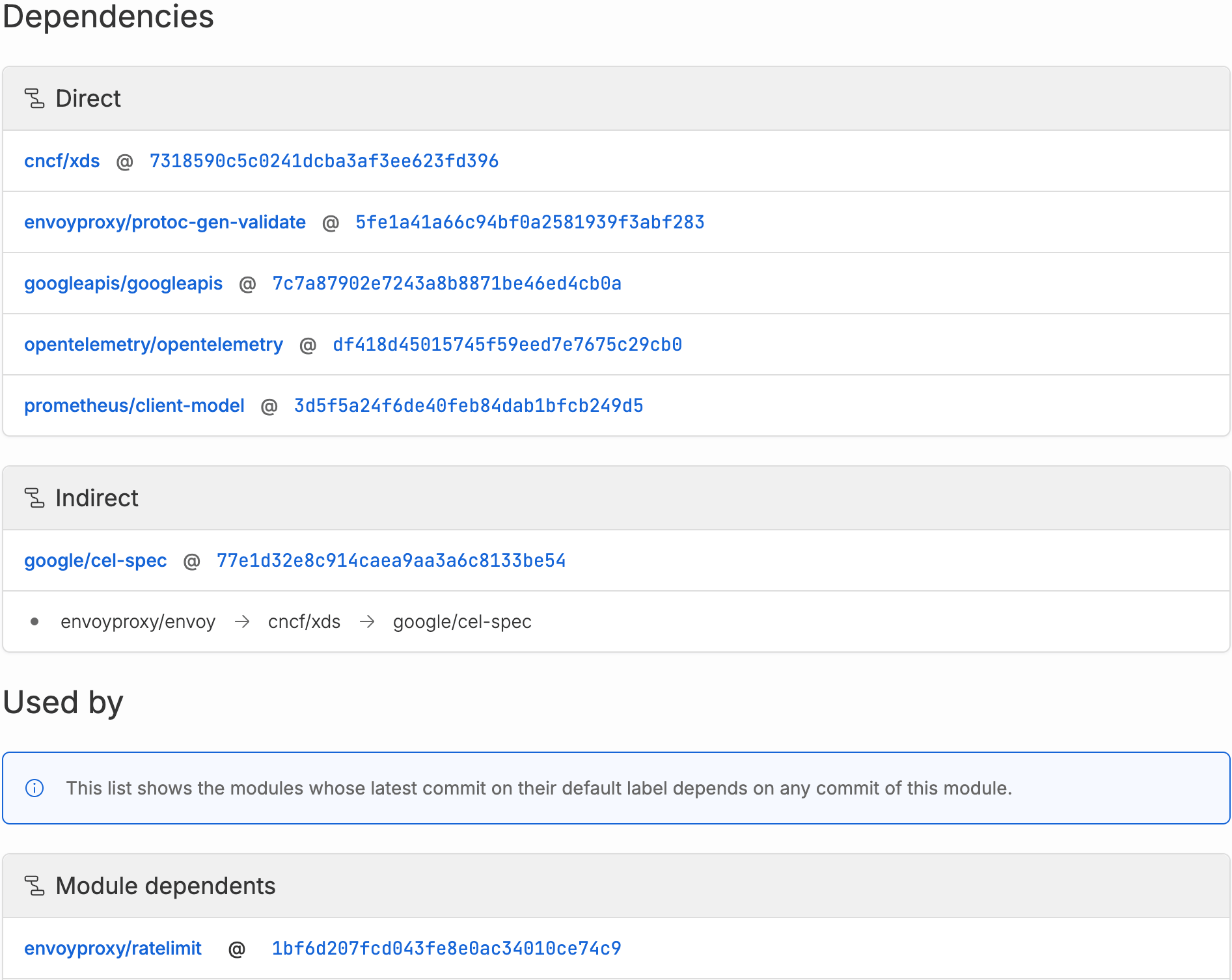
- Dependencies shows the dependencies of the module at the label or commit you’re currently viewing.
- Used by shows dependents across any of this module’s labels and commits, each pinned to the dependent’s latest commit on its default label. Older commits and non-default labels are not shown.