
Audit logs
A private BSR instance records mutations to the data it manages, and administrators can query those records through an audit API. This supports traceability, accountability, and compliance workflows on self-hosted deployments. Audit logs are a private-BSR feature; the public BSR at buf.build doesn’t expose this API.
What an audit event contains
Every audited event records what happened, when it happened, who did it, and which resource was affected. Some events carry an additional payload with details specific to the event type.
message Event {
  // Unique id of the audited event.
  string event_id = 1;
  // Type of the audited event. It specifies "what" happened.
  EventType type = 2;
  // Actor of the audited event. It specifies "who" did it.
  Actor actor = 3;
  // Resource of the audited event. It specifies "which resource" was affected.
  Resource resource = 4;
  // Time of the audited event. It specifies "when" it happened.
  google.protobuf.Timestamp event_time = 5;
  // Metadata about the audited event. It specifies additional details about the audited event.
  EventMetadata metadata = 6;
  oneof payload {
    // ... specific payload details depending on the event type.
  }
}
Actor and Resource each carry a Type, ID, and Name, so the payload is often redundant for simple events.
An actor is either a User or the System. When the actor is a user, EventMetadata records the user agent, IP address, and an internal trace ID to support investigation.
A resource is one of User, Organization, Organization Member, Repository, Repository Contributor, Repository Commit, or Plugin.
The payload field varies by EventType. The audit API reference lists the fields for each payload, and the full EventType enum lists every event the BSR audits.
Event categories
The BSR audits events across four resource families: users, organizations, repositories, and plugins. The tables below cover the most common events in each family. For the authoritative list, see the EventType enum.
User events
Events with a User as the affected resource.
| Event | Details |
|---|---|
| User Created | A user created an account on the BSR. |
| User Deactivated | A BSR admin deactivated a user’s account. |
| User Deleted | A user self-deleted their account (if the BSR instance allows it) or a BSR admin force-deleted the user. |
| User Logged In | Logged in three scenarios: the user authenticated via SAML and was auto-provisioned; the user logged in via SSO (OAuth/OIDC) with an existing account; or the user logged in via SSO and completed account registration. |
| User Logged Out | A user manually logged out. |
Organization events
Events with an Organization or Organization Member as the affected resource. Organizations have multiple members, each with a role.
| Event | Resource | Details |
|---|---|---|
| Organization Created | Organization | An organization was created. |
| Organization Deleted | Organization | An organization was deleted. |
| Organization Member Added | Organization Member | A user was added to an organization. The organization and the new role are logged. |
| Organization Member Removed | Organization Member | A user was removed from an organization. The organization and the old role are logged. |
| Organization Member Role Changed | Organization Member | An existing member’s role was changed. The organization, old role, and new role are logged. |
Repository events
Events with a Repository, Repository Contributor, or Repository Commit as the affected resource. Repositories have multiple contributors (each with a role) and a visibility (public or private).
| Event | Resource | Details |
|---|---|---|
| Repository Created | Repository | A repository was created. The owner and visibility are logged. |
| Repository Deleted | Repository | A repository was deleted. The owner and visibility are logged. |
| Repository Visibility Changed | Repository | A repository’s visibility changed. The owner, old visibility, and new visibility are logged. |
| Repository Commit Pushed | Repository Commit | A commit was pushed. The owner, repository, and label name (if any) are logged. |
| Repository Contributor Added | Repository Contributor | A user was added as a contributor. The owner, repository, and new role are logged. |
| Repository Contributor Removed | Repository Contributor | A user was removed as a contributor. The owner, repository, and old role are logged. |
| Repository Contributor Role Changed | Repository Contributor | An existing contributor’s role was changed. The owner, repository, old role, and new role are logged. |
Plugin events
Events with a Plugin as the affected resource.
| Event | Details |
|---|---|
| Plugin Created | A plugin was created. |
| Plugin Deleted | A plugin was deleted. |
Query audit events
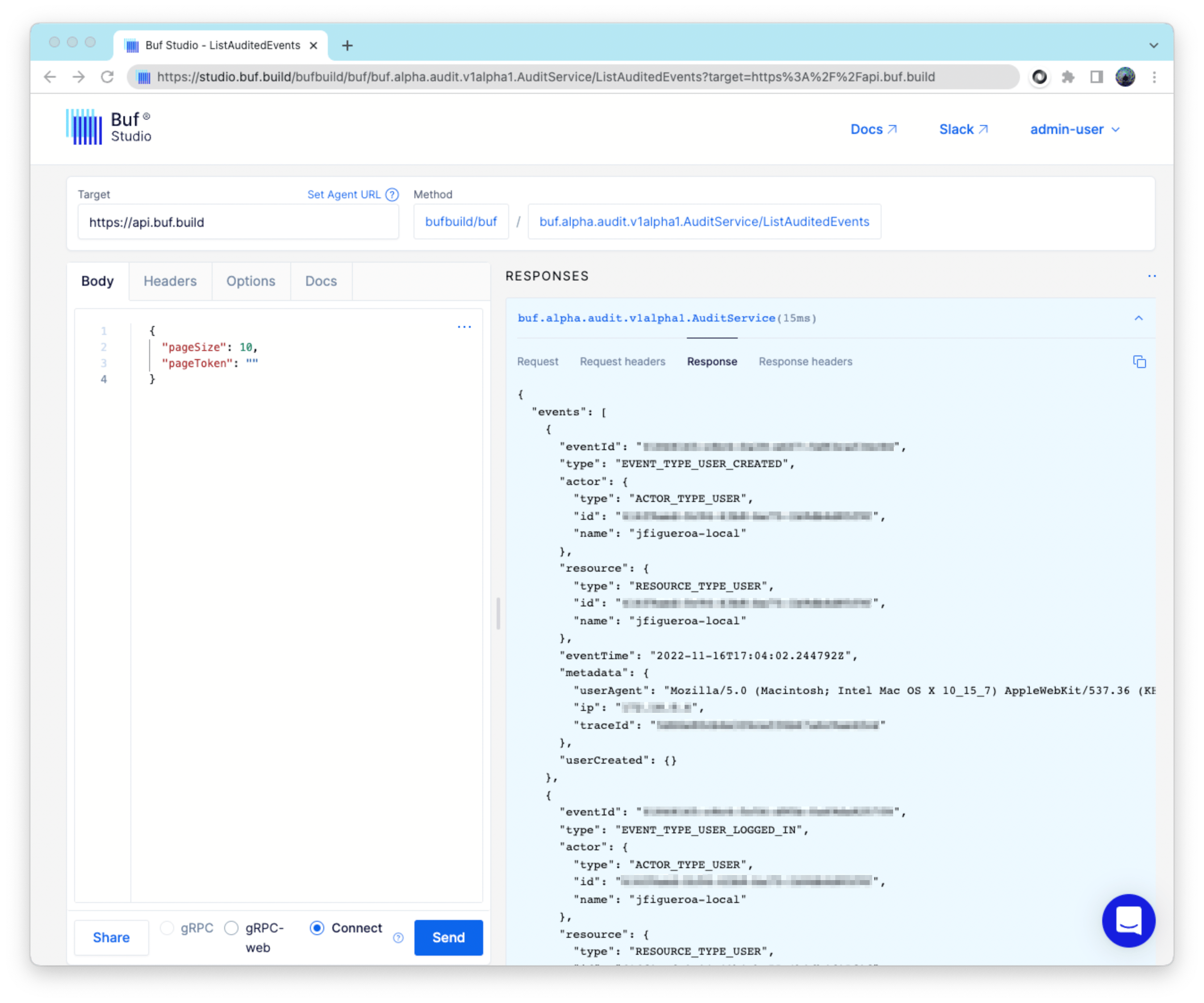
Audit events are read through the ListAuditedEvents RPC on buf.alpha.audit.v1alpha1.AuditService. The endpoint supports filtering by time range and paginating through results. Only an administrator can call it.
The easiest way to call the endpoint is with buf curl, using a token for an admin account:
buf curl \
    --schema buf.build/bufbuild/buf \
    --user-agent "audit-export" \
    --header "Authorization: Bearer $BUF_TOKEN" \
    --data '{"page_size": 100}' \
    https://<your-bsr-host>/buf.alpha.audit.v1alpha1.AuditService/ListAuditedEvents
Replace <your-bsr-host> with your BSR instance hostname and $BUF_TOKEN with an admin token. Pass a start_time and end_time in the request body to filter by time range, and use the returned next_page_token in a subsequent call to page through large result sets.
The BSR UI on a private instance also surfaces audit events for administrators:
Further reading
- User lifecycle: How admin users are created and how user accounts move through the system.
- Audit API reference: Full schema for
Event,EventType, and every payload.