
Customize SDK installation instructions
Custom SDK installation instructions let BSR administrators replace the default install commands shown in the BSR UI with text that matches their environment. The most common reason to use this feature is to redirect users to a caching proxy like Artifactory instead of pulling SDKs directly from the BSR.
This feature is available on Pro, Enterprise, and On-Prem instances of the BSR.
Where to find it
In the BSR UI, go to Admin panel > Custom SDK instructions:
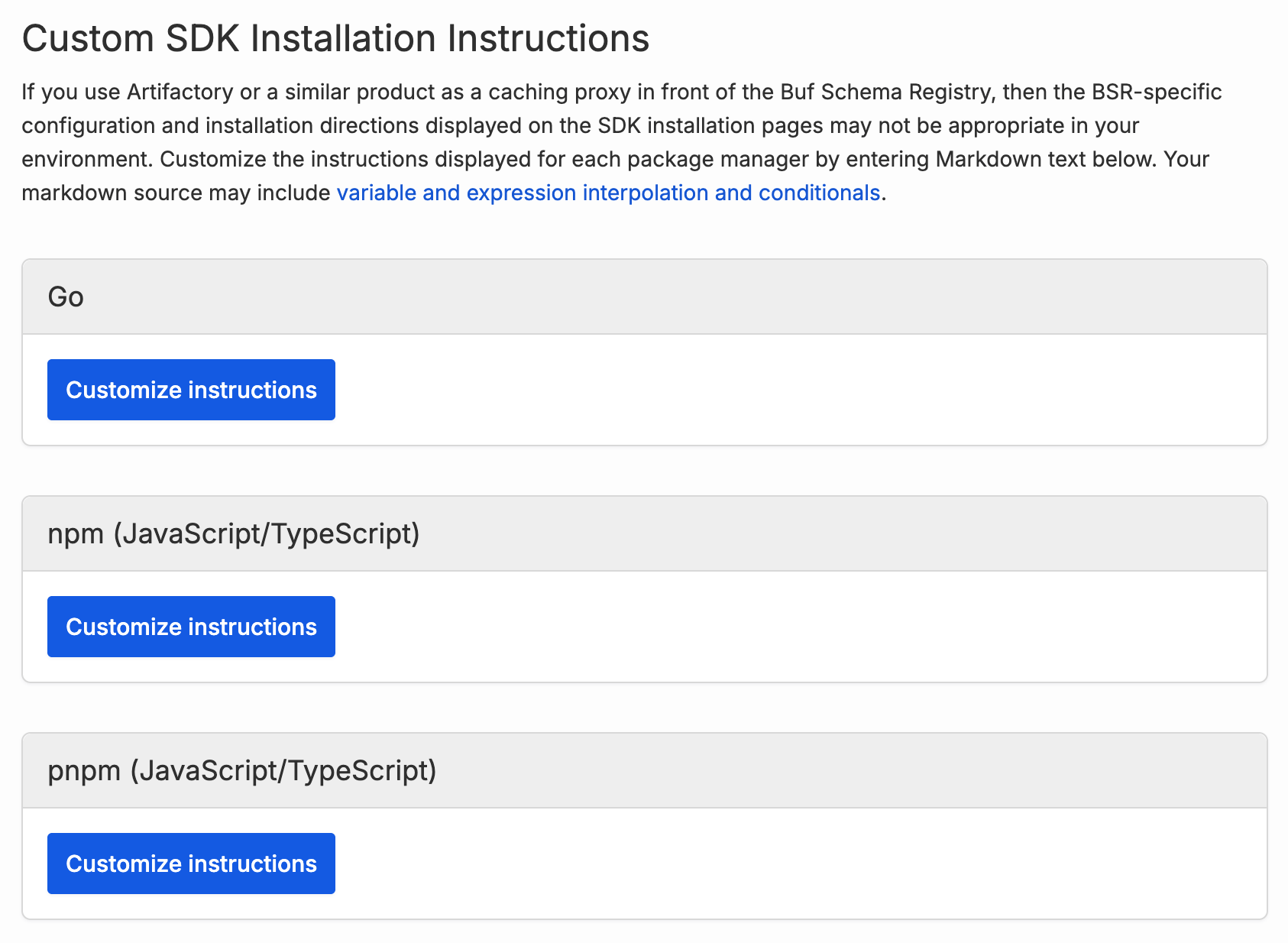
Instructions are customized on a per-package-manager basis: pip, npm, Go modules, Maven, Gradle, Cargo, CMake, Swift, curl, and the others listed in the admin panel. Each package manager has its own set of customizable Markdown.
For each package manager you can:
- Click Customize instructions to open the editor for the first time.
- Click Edit to modify an existing customization.
- Click Restore defaults to discard the customization and go back to the BSR’s built-in instructions.
Editing instructions
The editor opens with a Markdown template that closely replicates the BSR’s default installation instructions for that package manager. The template is a starting point: change as much or as little of it as you like.
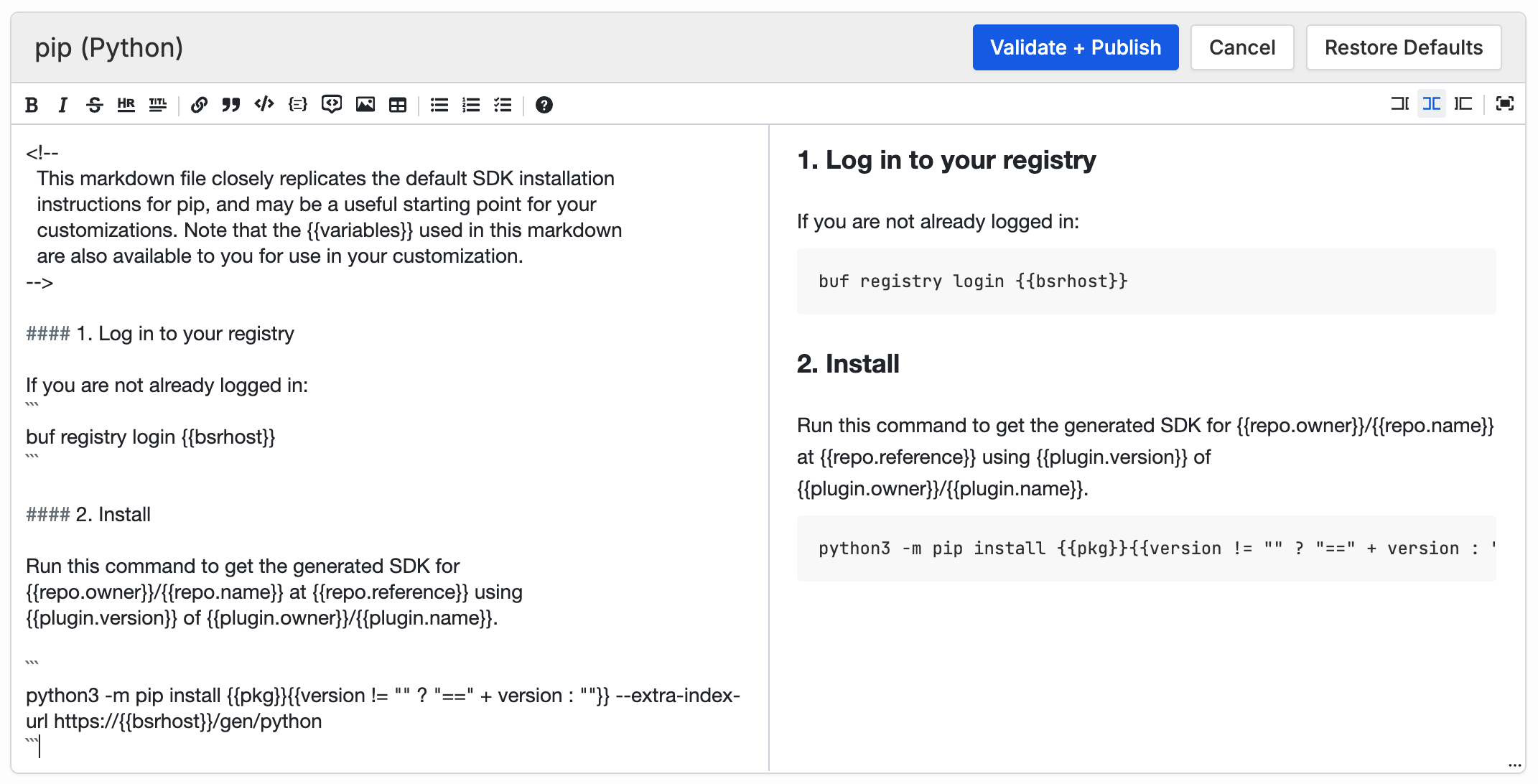
Notice that the markdown includes text like . Installation instructions vary by repo and plugin, so variables like are replaced with values specific to the SDK being viewed when the page is rendered.
The rest of this page covers how the BSR processes the markdown you enter:
- Variable substitution with
is what every customization uses. - CEL expressions inside
...let you transform variable values. #definelets you introduce your own variables.- Conditional directives (
#if,#ifdef,#else,#endif) let you include or exclude blocks of markdown based on the repo, plugin, or any other variable.
Note
The BSR validates everything (CEL expressions, #define directives, and conditional directives) at publish time. If there’s a syntax error or an unmatched #if/#endif, you can’t save the customization until the error is fixed.
Variable substitution
Variable names inside double curly braces are replaced with the variable’s value when the instructions are rendered for a specific repo and plugin. For the googleapis/googleapis SDK generated by the protocolbuffers/go plugin, for example, is replaced with googleapis/googleapis/protocolbuffers/go.
If you reference a variable that isn’t defined, no substitution happens and users see the original text in the rendered output. Writing , for instance, leaves in the output, because the defined variable for the current user is bsruser.
Universal variables
The following variables are defined for all package managers, with the same value across package managers. Their values are strings unless otherwise noted:
| Variable | Value |
|---|---|
bsrhost | The hostname of your BSR instance. |
bsruser | The username of the current BSR user, or the string YOUR BSR USERNAME if the user isn’t logged in. |
repo.owner | The BSR organization that owns the repo whose SDK is being installed. |
repo.name | The name of the repo (not including the organization) whose SDK is being installed. |
repo.reference | The reference for the repo version, typically a branch or tag name like main. |
plugin.owner | The BSR organization that owns the plugin used to generate the SDK. |
plugin.name | The name of the plugin (not including the organization) used to generate the SDK. |
plugin.version | The semantic version of the plugin used to generate the SDK. |
plugin.revision | The plugin revision (like a minor version number). Number, not string, which matters when comparing it in a CEL expression. |
Per-package-manager variables
These variables either have different values for different package managers or are only defined for some package managers. All values are strings:
| Variable | Package managers | Value |
|---|---|---|
pkg | all | The repo owner, repo name, plugin owner, and plugin name for the SDK package, formatted appropriately (with slashes or underscores, for example) for the current package manager. For example: googleapis/googleapis/protocolbuffers/go or googleapis-googleapis-protocolbuffers-python. |
version | all | The version of the repo combined with the version and revision of the plugin used to generate the SDK. For example: v1.36.2-20260306222252-5ba065e50397.1 (Go) or 30.2.0.1.20260306222252+5ba065e50397 (Python). If the latest version of the repo and plugin are used, this variable may be the string latest (for package managers that support it) or it may be the empty string. |
cmakePkgPath | CMake only | For CMake, the pkg variable has its parts separated by underscores. cmakePkgPath replaces those underscores with slashes. |
curlDownloadUrl | curl only | A direct BSR download URL for the package. |
curlExtension | curl only | Either zip or tar.gz, depending on the archive format the user has selected. |
curlQueryParams | curl only | For Dart packages only, a query string required at the end of the download URL. |
goPluginMajorVersion | Go only | If the plugin’s major version is 2 or greater, a string of the form /vx where x is the major version (/v2, /v12). Otherwise, the empty string. |
mavenGroupId | mvn, Gradle | For Java (or JVM) SDKs, the group ID for the SDK. |
swiftProduct | Swift, Xcode | The same information as pkg, with different delimiters and capitalization. |
CEL expressions
Anything inside ... can be a Common Expression Language (CEL) expression, not just a bare variable name. The expression is evaluated and its value is converted to a string and substituted into the markdown. Writing 5 renders as 5.
Expressions are most useful when they involve a variable. To render only the first 10 characters of version, write version.substring(0,10) instead of .
A common case is handling an empty version. When installing Python packages, the version string is prefixed with ==, but the == must be omitted when there’s no version. The ?: operator (familiar from C, Java, and JavaScript) handles this:
{ { version != "" ? "==" + version: "" } }If version isn’t empty, the expression is two equals signs concatenated with the version string. Otherwise it’s the empty string.
If a CEL expression references an undefined variable, no substitution is performed and users see the original text in the rendered output.
Defining your own variables
You can define new variables in your markdown using a #define directive whose syntax will look familiar if you’ve worked with C or C++:
#define <variable> <expression>The expression is a CEL expression, and variable becomes a new variable whose value is the expression’s value.
Note one difference from C-preprocessor #define: the right-hand side is a CEL expression, not literal text. To define a string variable, enclose the value in double quotes. For example, to give your Artifactory hostname a short name to reuse throughout the markdown:
#define HOST "https://artifactory.example.com"After this line, you can write anywhere you want to reference Artifactory.
A few other rules for #define:
- The
#definemust appear at the start of a line, with no whitespace before or after the#character. - Variables defined this way can only be used after they’re defined, not before.
- You can use
#defineto change the value of an existing variable, though this is generally not a good idea. - You can delete a variable with
#undef <variable>.
Conditional directives
Conditional directives include or exclude blocks of text from your markdown based on a CEL expression. They let you display different instructions for different repositories, organizations, or plugins. Most BSR installations don’t need this, but here’s an example that points users at an organization-specific Artifactory instance:
#if repo.owner == "widgets"
#define HOST "artifactory.widgets.example.com"
#elif repo.owner == "gadgets"
#define HOST "artifactory.gadgets.example.com"
#endif

#ifdef HOST

  custom installation instructions for SDKs from the widgets and gadgets
  organizations go here, using {{HOST}} to refer to the org-specific
  Artifactory instance.

#endif
#if and #elif take CEL expressions and include the lines that follow if the expression is true (or a non-zero number, or a non-empty string). The example checks for repos in the widgets and gadgets organizations and sets HOST to an organization-specific Artifactory instance just for repos in those two orgs. It then checks whether HOST is defined and, if so, includes custom instructions that use . Users browsing SDKs in either of those two organizations see the custom instructions.
One important behavior: if your customized markdown ends up excluding all of its content, the BSR falls back to its default, un-customized instructions. In the example above, any repo not owned by widgets or gadgets never has HOST defined, so the #ifdef HOST block is skipped and the BSR shows its default instructions instead.
As with #define, conditional directives must start with the # character at the beginning of a line with no whitespace before or after #. This avoids conflicts with Markdown headings, which always have a space after #. Every #if must have a matching #endif, and you can’t have an #else or #elif without an #if.
Directive reference
#define NAME expression
Defines a variable named NAME and sets its value to the value of the CEL expression. The name must be a simple identifier with no spaces or periods. Everything following the name is the expression. Variables defined this way are available in subsequent CEL expressions.
#undef NAME
Removes a previously defined variable.
#ifdef NAME / #ifndef NAME
Conditionally includes the following lines, up to the next #else or #endif, based on whether a variable is defined (#ifdef) or not defined (#ifndef). The variable’s value isn’t relevant; only whether it’s been defined.
#if EXPRESSION / #elif EXPRESSION
Conditionally includes the following lines, up to the next #else or #endif, based on whether a CEL expression evaluates to true (or any value other than false, 0, "", or null).
#else
Begins the else branch of a conditional block. If all of the previous #if and #elif directives were excluded, lines between this #else and the next #endif are included. Otherwise, if any of the previous branches were included, the lines up to the #endif are excluded.
#endif
Ends a conditional block. Every #ifdef, #ifndef, or #if must have a matching #endif.