
Code generation — Usage guide
This page covers common usage patterns and command-line options for buf generate. For initial setup, see the quickstart.
How code generation works
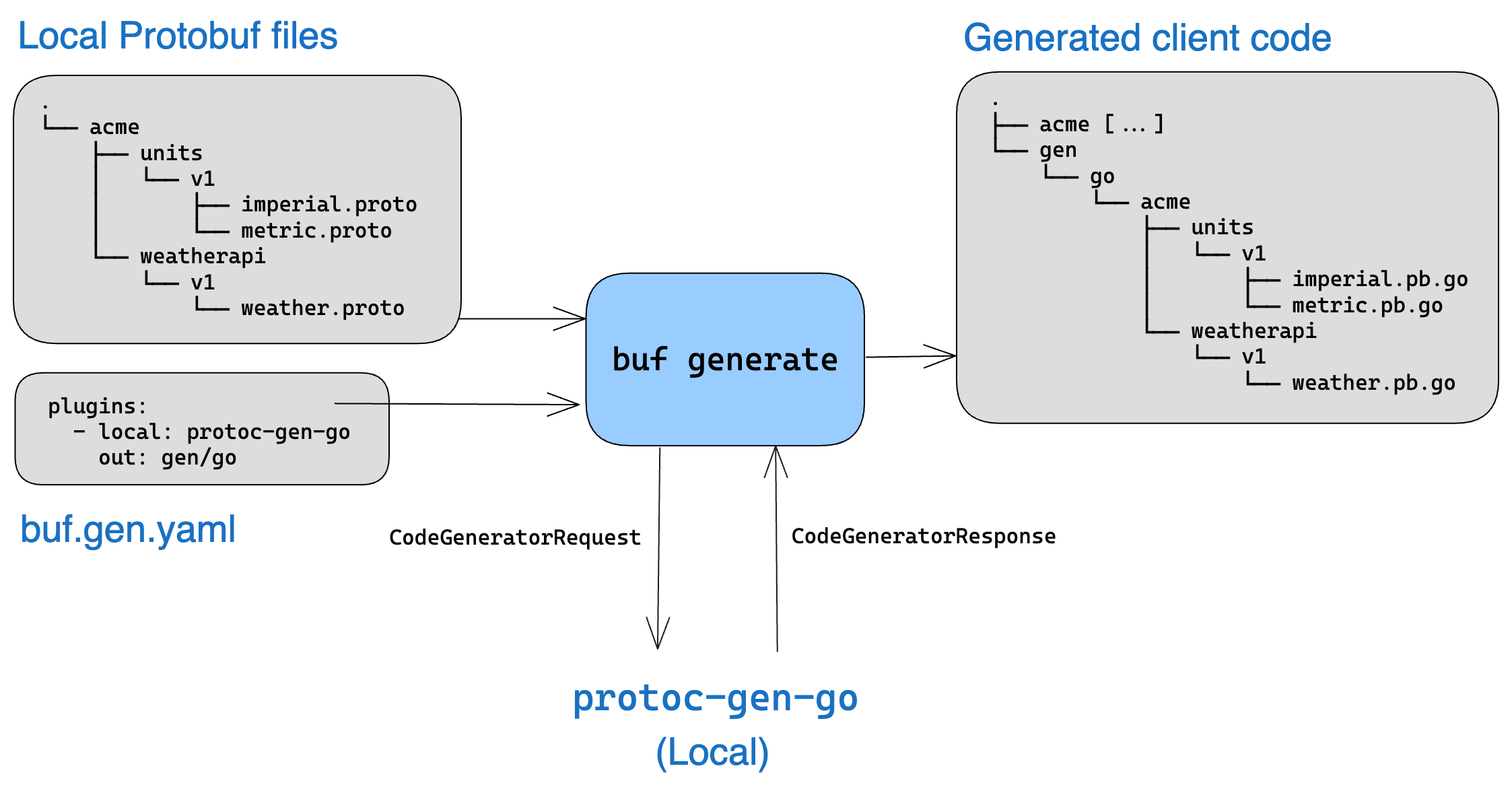
Local plugins
With locally installed plugins, buf generate works similarly to protoc, but faster. The plugins.local key specifies a local version of the plugin.
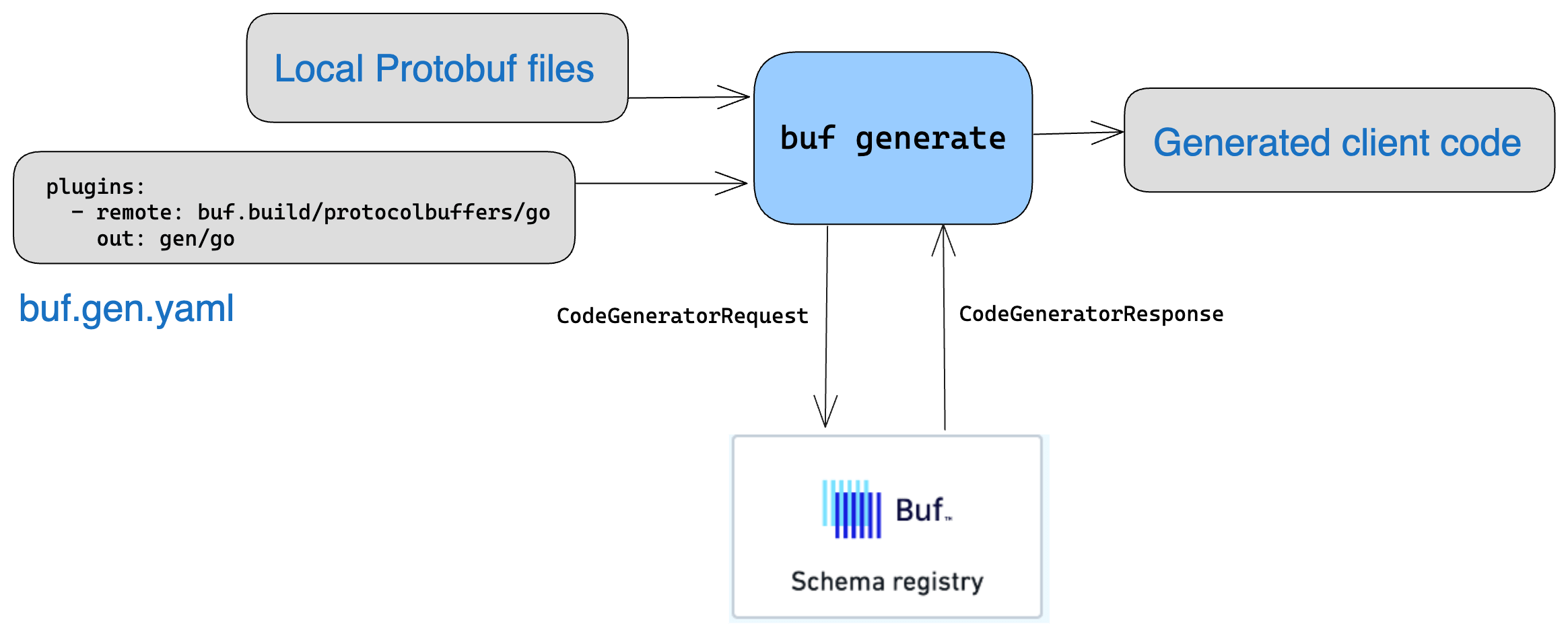
Remote plugins
With remote plugins, code generation takes place on the BSR. Just point the plugins.remote key to the BSR, and it generates the code.
Command-line examples
The examples below show different ways to run buf generate with various inputs, flags, and configuration options. While we recommend putting your configuration in buf.gen.yaml, you can also pass inputs and options directly at the command line.
Command-line options override options in buf.gen.yaml.
Generate from current workspace
Generate from the current workspace root
buf generateGenerate from a BSR module
Generate from a BSR module
buf generate buf.build/bufbuild/protovalidate
# Generate from a specific version using a label
buf generate buf.build/bufbuild/protovalidate:v1.0.0
Generate from a GitHub repository
Generate from a GitHub repository
buf generate https://github.com/foo/bar.gitInclude dependencies and Well-Known Types
By default, code generation doesn't include your imports or the Well-Known Types (WKT). To include them, pass the appropriate flags:
Include dependencies, without WKT
buf generate --include-importsInclude WKT
# The --include-imports flag is required
buf generate --include-imports --include-wkt
Limit to specific files
By default, the Buf CLI builds all files in the workspace. You can instead manually specify the file or directory paths to build. This is an advanced feature intended to be used for editor or Bazel integration. It's better to let the Buf CLI discover all files under management and handle this for you.
If you only want to generate code for a subset of your input, you can do so via the --path flag:
Only generate for the files in the directories proto/foo and proto/bar
buf generate --path proto/foo --path proto/barOnly generate for the files proto/foo/foo.proto and proto/foo/bar.proto
buf generate --path proto/foo/foo.proto --path proto/foo/bar.protoOnly generate for the files in the directory proto/foo in your GitHub repository
buf generate https://github.com/foo/bar.git --template data/generate.yaml --path proto/fooYou can also exclude paths by using the --exclude-path flag:
Exclude the files in the directory proto/foo
buf generate --exclude-path proto/bazThese flags can be combined to include and exclude files as needed.
This is equivalent to specifying the paths and exclude_paths for an input in the buf.gen.yaml file:
buf.gen.yaml
version: v2
inputs:
  - directory: .
    path:
      - proto/foo/
    exclude_path:
      - proto/foo/baz.proto
plugins:
  - local: protoc-gen-go
    out: gen/go
    opt: paths=source_relative
Setting the flag --path and --exclude-path overrides the paths and exclude paths specified in the inputs in the buf.gen.yaml file.
Limit to specific types
By default, the Buf CLI generates code for all types in your source files. However, you can request that it only generate a subset by specifying a list of types in buf.gen.yaml. A common use case is to output a single service for use in mobile and web apps, where shipping unused code is expensive. The resulting schema contains only the types you specify and their dependencies, according to the following principles:
- All type names must be fully qualified. If any name is unknown, the request fails and no output is returned.
- When a message is included, any type references therein (like fields that refer to other message or enum types) are also included. If any included message is extendable (a
proto2-only feature), its known extensions are included. - If a particular method is included, its request and response message types are also included, but other methods that belong to the same service won't (unless they're also included).
- If a service is included, all of its methods (and their request and response types) are included.
- If any included types have custom options, the definitions for those custom options are included.
- You can use this for any type of input.
To generate code for a subset of your types, specify it as a list of the types:
buf.gen.yaml
version: v2
inputs:
  - module: MODULE_NAME
    types:
      - "foo.v1.User"
      - "foo.v1.UserService"
You can also use the --type flag, which gets precedence over whatever is configured in buf.gen.yaml.
Only generate the type with a fully qualified name of foo.v1.User
buf generate --type foo.v1.UserGenerate to a specific directory
You can generate to a specific output directory using the --output or -o flag. This command generates to the bar/ directory while prepending bar/ to the out directives in the buf.gen.yaml file:
buf generate https://github.com/foo/bar.git -o barThe paths in the config file and the -o flag are interpreted as relative to your current directory, so you can place your config files anywhere.
Use alternative configuration files
The config file doesn't have to be named buf.gen.yaml, nor does it have to be in the directory where you're invoking buf generate. To specify a config file elsewhere, use the --template flag:
buf generate buf.build/acme/petapis --template templates/generation.yamlIf you want to use different plugin options for the same input, we recommend creating separate, uniquely-named buf.gen.yaml files for each configuration. You can then run buf generate once for each configuration file with the --template flag. For example, to use one file for Go and a different file for Java, you could create buf.gen.go.yaml and buf.gen.java.yaml files and then run these commands:
buf generate --template buf.gen.go.yaml
buf generate --template buf.gen.java.yaml
Generate without a configuration file
Although we recommend using a configuration file, without one buf generate assumes the input is the current directory. You can also specify the config file as JSON in the invocation. This can be useful when configuring CI/CD builds for an organization when you want to centralize the configuration for all teams.
buf generate --template '{"version":"v2","plugins":[{"protoc_builtin":"go","out":"gen/go"}]}'